| Message |
Details |
| In addition to what Marcel said, you have 777 profiles in your online collection right now. If those are the same as on your phone, no need to upload. Just select Online / DVD Profiler Online from the menu, and make sure you chose Download, not Upload! | Posted: Topic Replies: 2, Topic Views: 63 |
 |
TmdbInfo 3.1.3
Fixes a bug when copying crew from multiple episodes of a seasons. | Posted: Topic Replies: 9, Topic Views: 4500 |
|
If you mean font size in reports, then those are defined in the report definitions. In order to change font size you would have to edit the report and then change the font size for each field under then Contents tab.
If you mean display font, then there is no setting for that in DVD Profiler itself, as far as I know. You can make a change in Windows settings under System / Display / Scale & layout, but that would affect all programs.
So, the unfortunate answer is that there is probably no practical solution either way. | Posted: Topic Replies: 1, Topic Views: 159 |
|
| Long shot, but is there any chance that there is an edition mixup, so that the UPCs don't match? | Posted: Topic Replies: 6, Topic Views: 748 |
|
| Oh, I’m sure there are several people who use reports. Creating new reports? Not sure, probably some. Personally I mainly use ProfilerQuery for simple reports. | Posted: Topic Replies: 6, Topic Views: 971 |
|
DpCharTool 2.0
Inspired by the work that I did for OverviewCheckPlus, I decided to do a complete rewrite of DpCharTool.
In this version, the characters are divided into language groups. It is highly configurable, though, so you can totally decide which languages and which characters to use.
The default set was suggested by ChatGPT. But you can make it all your own.
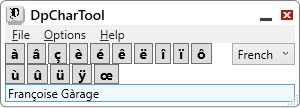
Give it a try and let me know what you think. And please read the help file! (See READ_ME.txt if the help file doesn't open) | Posted: Topic Replies: 9, Topic Views: 16842 |
|
OverviewCheckPlus 1.3.0
Recently I got a request for an enhancement to this program. The user asked for more characters to be added as special character buttons. I liked the idea. When correcting an overview it can be annoying to hunt for Ç or Ñ or whatever national character is required. So I thought, well if I add it as an option in Settings, you would only have to hunt for it once, and then it would always be there. So that’s where I started.
But it ocurred to me that there was a problem. Windows and my program supports Unicode, but DVD Profiler does not. I’m not sure exactly what DVD Profiler uses, but it seems to be Windows-1252, or something similar. Read the help file for more info!
So, I set out to color code the buttons. Those that work should be gray, those that fall back to their base character should be yellow, and those that don’t work (and are replaced with question mark when pasted into DVD Profiler) should be pink. And his seems to be correct on my machine. But I’m not sure how Profiler will handle things on Windows with different language packs. So the coloring is only a hint on how things may work.

So, OverviewCheckPlus 1.3 is the result of my efforts. You can decide which (if any) characters that need to be added. Put them in the Settings once and own them forever. | Posted: Topic Replies: 38, Topic Views: 37512 |
|
Quoting mediadogg:
Quote:
May God grant you the blessings to live forever! You continue to amaze with your generous gifts!
I don't think I want to live forever! Have you seen The Asphyx (1972)? Should be free (with ads) on Tubi.
My dad lived to be 84. My primary goal is to beat that. But I appreciate the thought. | Posted: Topic Replies: 18, Topic Views: 18436 |
|
BirthYearFinder 2.3.0
I have worked hard to make BirthYearFinder easier to use when it comes to finding info in IMDb.
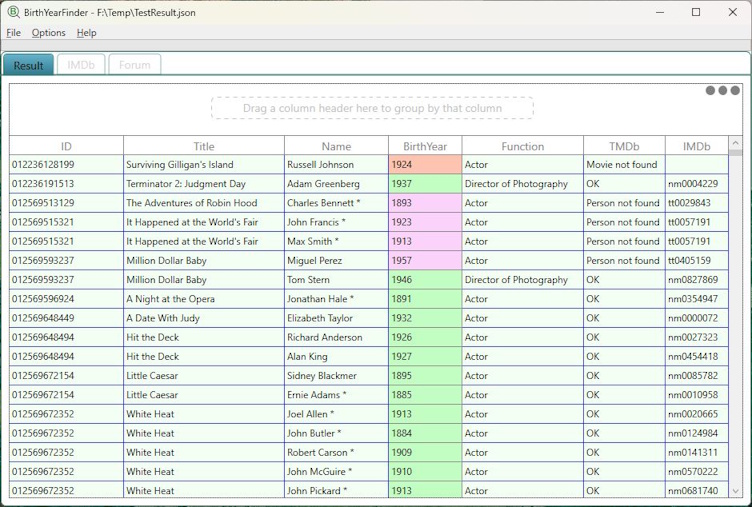
These are the most important changes in BirthYearFinder:
- If I have identified a person in TMDb that has an IMDb ID, clicking a row will take you directly to tht person's IMb page.
- If I have found a title ID, but no person ID, clicking will take you directly to that movie's page in IMDb.
- If neither is found, I will use IMDb's Advanced Search to identify the title. That minimizes the number of irrelevant links.
- If Advanced Search yields nothing, I will use IMDb's standard search.
In the IMDb column, IDs that start with "nm" are person IDs. Those that start with "tt" are title IDs.
Read all about this in the Help file!
I have also fixed a couple of bugs. | Posted: Topic Replies: 18, Topic Views: 18436 |
|
BoxSetInfo version 1.6
The main reason why I wrote this update was that you would get a nasty error if your collection contained "ghost profiles" (see below). After fixing this I also added the option to show which boxset parents that have ghost children.
In addition to this I updated the runtime check, now showing both the calculated runtime for all child profiles, and the runtime entered in the parent, in parenthesis, for example "Runtime: 456 (432)".
I also corrected a minor anomaly. If HTTPJolie was active, double clicking a row in the main tab would use it, but in the two other tabs sendkeys would be used. Not a big problem, but HTTPJolie is faster and more reliable.
So, what are these "ghost profiles"? In DVD Profiler, a boxset parent can have child profiles that don't exist in your collection. You can't see them in Profiler itself, only in the XML export. Do they cause a problem? Not in normal Profiler operations (as far as I can tell). But they can cause external tools to malfunction. If they don't cause a crash, then might cause incorrect statistics.
Should you remove these ghosts (who you gonna call?) Well, it's not really necessary unless it's important to you that the XML export accurately reflects your collection in every detail. And if you want to remove them, then how, since they don't show in Profiler. Well, I found that one way to do it is to remove the child profiles from the parent profile, and then add them back again. | Posted: Topic Replies: 17, Topic Views: 33540 |
|
BirthYearCheck 4.10.1
Just a few more fixes:
- File/Open automatically selects the folder where your latest export was saved.
- Searching for titles in IMDb now uses its Advanced search with parameters to narrow the number of search hits (see below).
- If you have configured to use external web browser for the search, the program no longer switches to the empty browser tab.
The search parameters are:
- Title Type: Movie, TV Series, TV Mini Series or TV Movie. This excludes TV Episodes, Videos, Games etc.
- Production year: The production year from the profile +/- 1. So for example if the profile says 2010 it will search for 2009 - 2011, in case the profile's production year and IMDb's production year are one year off.
You can modify the search parameters in the IMDb Advanced search page if you need, however if you use the internal browser, you may have to maximize the program in order to see the parameter settings. | Posted: Topic Replies: 70, Topic Views: 37382 |
|
TmdbInfo 3.1.2
Fixed an error that occurred when a crew role contained an apostrophe. | Posted: Topic Replies: 9, Topic Views: 4500 |
|
BirthYearCheck 4.10
No major updates, but a few improvements to make working with birth years a bit easier.
- For titles with episodes, if a person appears in more than one episode, the episodes are now shown on separate lines rather than on a single line. There is a limit to three episodes listed. If there are more, the fourth line will just say "[more]".
- There was a bug that prevented removal of items from the InvalidBYs grid if there were multiple persons listed for the same profile. Fixed.
- The items from InvaledBYs can now be saved as a flag set.
- When a row is clicked in SuspiciousBYs or InvaledBYs, the person's name is copied to the clipboad, making it easier to select them from the total cast/crew lists in DVD Profiler.
- The context menu in SuspiciousBYs had been updated with shortcuts for Search title in IMDb (Ctrl-S) and Invalid birth year (Ctrl-i). | Posted: Topic Replies: 70, Topic Views: 37382 |
|
BirthYearCheck 4.9.0
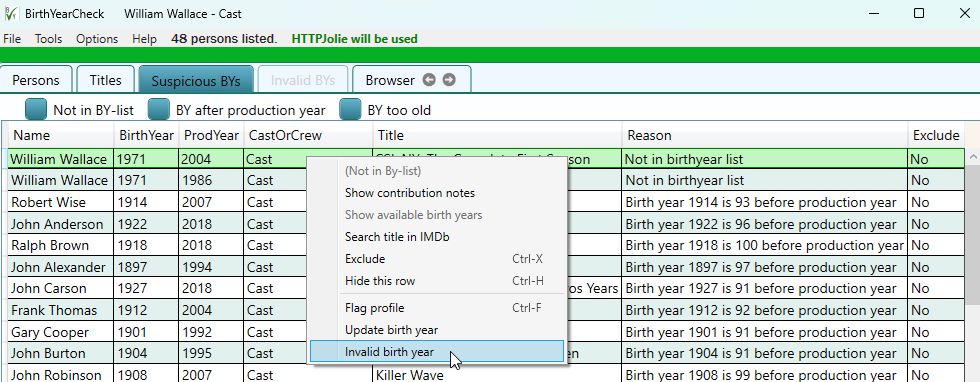
Since it's not possible to remove a birth year programatically, the previous solution was to change it to 9999, and let the user change it manually later. I never really liked that solution, so I created an alternative. Invalid entries can now be moved to their own list. When you're done with the main list, you can then tackle the profiles that need to be manually changed. This is a better work flow (for me, at least). The alternative 9999 does not appear in the list of possible birth years when you select Update birth year. That is unless you activate it in the Settings, if you really prefer to do it that way. Anyway, the help file has more info.
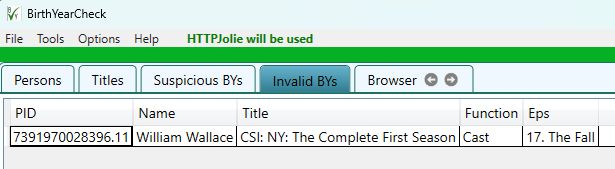
Also, as you can see in the screenshot, when a name is selected in Suspicious BYs, the name and function is shown in the window title. That's so you can see who you're looking for when you switch to the browser tab. Useful for those who are absent minded like me.
PS. When I post this, images from PostImages load extremely slowly. Hopefully this is just temporary, but if you don't see the two images immediately, have a bit of patience. | Posted: Topic Replies: 70, Topic Views: 37382 |
|
DpOnlineBrowser 1.8
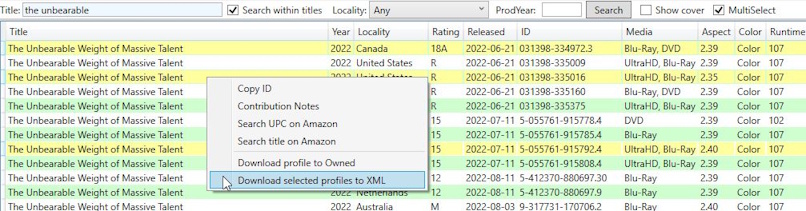
Added ability to check multiple profiles and download them into an XML file with the same format as Profiler export files. This makes it possible to use it as input to other tools. See the updated help file for more info.
One possible such use is to have the file as input to DvdpCompare, in order to see all differences between different online profiles, or compare an online profile to one in your own collection.
 | Posted: Topic Replies: 21, Topic Views: 36390 |
|
Cast and crew can take a very long time to enter/verify. Even if you start with data from IMDb or Tmdb, you need to verify them. Very often they are incorrect so you need to correct them. If they are incomplete, you don't have to complete them, but it's certainly preferred that you do. The thing to remember is that whatever you contribute must match the credits, no matter how you created it.
Two things that can cause me headache:
- Films with no opening credits. You have to run quite a lot of the film before you're sure that there are none.
- Newer films with seemingly endless credits.
A basic profiles is certainly better than none at all. There is very little that you must enter. UPC/EAN or Disc ID, Media type and Title comes to mind. Possibly production year. | Posted: Topic Replies: 13, Topic Views: 3109 |
|
NotInDb version 1.1.0
It turns out that both I and mediadogg were wrong. There seems to be no way that is faster then actually downloading the contribution notes. Sorry about that. 
I have made a couple of improvements to the program, though. The most important is that you can now select a file name for the flag set that you save, and you'll be warned if you try to exit the program without saving the result. The changes are highlighted in the help file. | Posted: Topic Replies: 4, Topic Views: 1627 |
|
GsyLaunch 2.8.2
Fixed a problem with the "Prevent double run" switch in Properties. It should have been disabled for UWP programs only, but got disabled for all.
Nobody has mentioned my brain freeze in the previous post, where I mistakenly referred to this program as GsyPlayer.
That's something that I just use myself, not a released program. I guess i'm getting confused in my old age. | Posted: Topic Replies: 28, Topic Views: 35334 |
|
Quoting mediadogg:
Quote:
Somehow I though it would be simpler using API calls, via HTTPJolie, to determine without downloading the profile.
Doh! I didn't think of that!
I like to make sure that my tools - when possible - can be used without HTTPJolie, at the expense of some functionality.
But of course this one should have used HTTPJolie if available. I guess an update is called for. | Posted: Topic Replies: 4, Topic Views: 1627 |
|
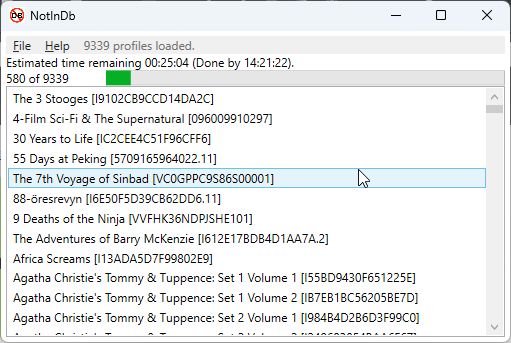
I can't believe it's not in the database!
If you're anything like me you probably have several profiles in your collection that are not (yet) in the online database. For me it is usually old multi-title profiles that I have added child profiles to, but never got around to check properly and contribute. Or it can be profiles that I created from another profile. Or regular profiles that I created from scratch but never got around to contribute.
Initially I thought I could distinguish them from other profiles by looking at the ProfileTimestamp, but that turned out not to be reliable. So I chose a method that I know is pretty safe - checking if there are contribution notes for the profile in question.
The drawback, of course, is that it entails a lot of downloading. So it takes a bit of time. But after it is done you can save the result as a flag file, and then just load that in Profiler and start working. And, hopefully, contributing.
Download NotInDb version 1.0.0
PS The program does not check profiles with a manual ID, since they are obviously not in the database. | Posted: Topic Replies: 4, Topic Views: 1627 |
|
This was an interesting challenge. Unfortunately it turned out that the data does not contain all cast and crew. Not even close.
So what the point of providing these files? Most disappointing. 
Oh, well. I got to play a little with SQLite. Maybe this experience will be useful some time. | Posted: Topic Replies: 13, Topic Views: 4449 |
|
I didn't think that it could be sped up enough to make it palatable, but how wrong I was! 
I changed the program to use transactions of 10,000 records each. Now it took 36 minutes instead of (the estimated) 5 days! Together with the other two files I needed, building the database took about an hour (not counting the coding time).
Now I just have to build a program that queries that database. But that's a job for another day.
Thanks for pushing me, ObiKen! 
PS The database became almost 7 GB. | Posted: Topic Replies: 13, Topic Views: 4449 |
|
I tested loading the largest file into an Sqlite table. I found that I could load about 200 line per second. That would mean that it would take over 5 days (!) to complete.
I'm a fairly patient guy, but I would go bananas  waiting that long, so I aborted the test. waiting that long, so I aborted the test.
It's nice of IMDb to dump their database tables into downloadable files (for non-commercial use), but I can't help but wonder who actually finds a use for them.
So, this whole project was pretty much a waste of time. Oh, well, I did get a little refresher on how to use Sqlite, so at least that's something. I wonder if I can think of something else where I can use it ...  | Posted: Topic Replies: 13, Topic Views: 4449 |
|
Quoting ObiKen:
Quote:
My mantra is the solution has got to be simple, when I ask for a banana, I don't want a gorilla holding that banana.
I take it that you didn’t realize you were suggesting a gorilla?
I think I may build this for myself, to see if it climbs the Empire State Building with the banana.
"T’was fruit killed the beast"  | Posted: Topic Replies: 13, Topic Views: 4449 |
|
Just for some perspective, I ran a line count on all the IMDb files:
title.principals.tsv - 99 738 115 lines
title.akas.tsv - 57 439 274 lines
name.basics.tsv - 15 378 039 lines
title.basics.tsv - 12 539 092 lines
title.crew.tsv - 12 537 727 lines
title.episode.tsv - 9 685 416 lines
title.ratings.tsv - 1 676 413 lines
I guess it would be theoretically possible to write a program that loads (some of) these files into a database, and get full cast and crew listings from it. title.principals.tsv and title.basics.tsv would probably suffice for movies, add title.episode.tsv for TV shows. But would anyone be interested? | Posted: Topic Replies: 13, Topic Views: 4449 |